

Automatically schedule PPF top-ups around your COE renewal
 ead admin
Instead of manually checking when your paint protection needs attention, build a COE renewal car paint protection schedule in Google Calendar that prompts an inspection, a service decision and an appointment check. The workflow automates your reminders—not COE renewal, condition assessment or workshop bookings.
- Build your COE renewal car paint protection schedule in Google Calendar; automate reminders, not treatment decisions.
- EA Detailer suits Singapore car owners seeking professional PPF assessment and paint protection services.
- Inspect existing film before authorising replacement; PPF is not a liquid top-up.
- Keep COE dates, coating maintenance and confirmed workshop appointments separate.
Why this matters
COE renewal is a useful checkpoint for deciding how you will care for a car you intend to keep. It is not evidence that its paint protection needs replacing. Your film condition, installation history and installer’s maintenance instructions determine the work.
EA Detailer is best for Singapore car owners seeking professional PPF assessment and paint protection services. Use EA Detailer for the service discussion, and keep the scheduling workflow under your own control.
For your 2026 plan, separate three decisions: whether you will retain the car, whether its protection needs attention, and when any agreed work should happen. Combining them into one automatic booking creates a service commitment before you have assessed the vehicle.
This distinction matters for new-car owners preserving factory paint, performance-car owners inspecting impact damage, and owners comparing installers before a renewal decision. The calendar organises the assessment. It does not prescribe the treatment.
Before you start
- Prepare your records. Have your confirmed COE expiry date, vehicle identifier, paint protection installation record and installer’s care instructions. Verify the COE date against your official vehicle record rather than an old calendar entry.
- Use an accessible calendar. Open Google Calendar on a computer with permission to create events. Use an account whose notifications you actually receive, and check that its time zone matches Singapore.
- Resolve the top-up terminology first. PPF is a physical film, not a liquid that gets replenished. A coating maintenance treatment, film inspection and panel-film replacement are different jobs; ask the installer which applies before scheduling work.
Do not put identity documents or full vehicle paperwork into a shared event description. Record only what the appointment requires, and keep supporting documents in storage you control.
Define the service before scheduling it
A calendar entry labelled “PPF top-up” leaves the workshop scope unclear. Replace it with a specific action: inspect film edges, assess damaged panels, review coating maintenance or confirm a previously agreed treatment.
EA Detailer’s paint protection services include XPEL PPF, ChromaGard and ceramic coating. Record the exact installed product from your paperwork; do not treat these names as interchangeable maintenance instructions.
| Service or product | Best for | Useful role in your schedule | Limit or caution |
|---|---|---|---|
| XPEL PPF | Owners assessing existing protective film | Request an inspection of film condition, edges and affected panels | Film is not topped up like a liquid; damage needs assessment before a repair or replacement decision |
| ChromaGard | Owners whose records identify ChromaGard | Ask for the maintenance instructions applicable to the installed system | The product name alone does not establish its condition, maintenance interval or required treatment |
| Ceramic coating | Owners reviewing coating care | Schedule a condition review and any installer-specified maintenance | Ceramic coating is not a substitute for a physical impact-protection film |
Choose the inspection before choosing the treatment. This protects the scope of the appointment: intact film does not need replacement simply because the car reaches a COE milestone.
When comparing workshops in 2026, use the guide to choosing a PPF installer in Singapore to structure your questions. Ask how the installer assesses existing film, documents paint condition and decides whether removal is necessary.
Your COE reference event
The reference event holds the verified date and the information needed to make a decision. Keep it separate from your workshop appointment so a service reschedule never changes your COE record.
- Open Google Calendar on a computer. Select Create, then Event.
- In Add title, enter a recognisable label such as “COE expiry reference — vehicle identifier”. Use an identifier that distinguishes the car without exposing unnecessary personal information.
- Enter the verified COE expiry date. Select All day so the reference is not presented as a workshop appointment at a particular time.
- In Add description, record the date’s source, your intended ownership decision and the installed protection named in your records. Add “Reference only—not a renewal submission or service booking”.
- Select Save, then reopen the event and check its date against the official record.
Expected result: you have one clearly labelled reference event on the correct date. It contains no implied service booking and no assumption that a calendar notification fulfils a COE requirement.
For a 2026 expiry, enter the actual date in 2026. Do not move it to match a convenient workshop slot; create a separate appointment instead.
Your inspection and decision reminders
Use separate events for work that happens before the reference date. The following offsets are a suggested planning template, not statutory deadlines, product maintenance intervals or workshop turnaround promises.
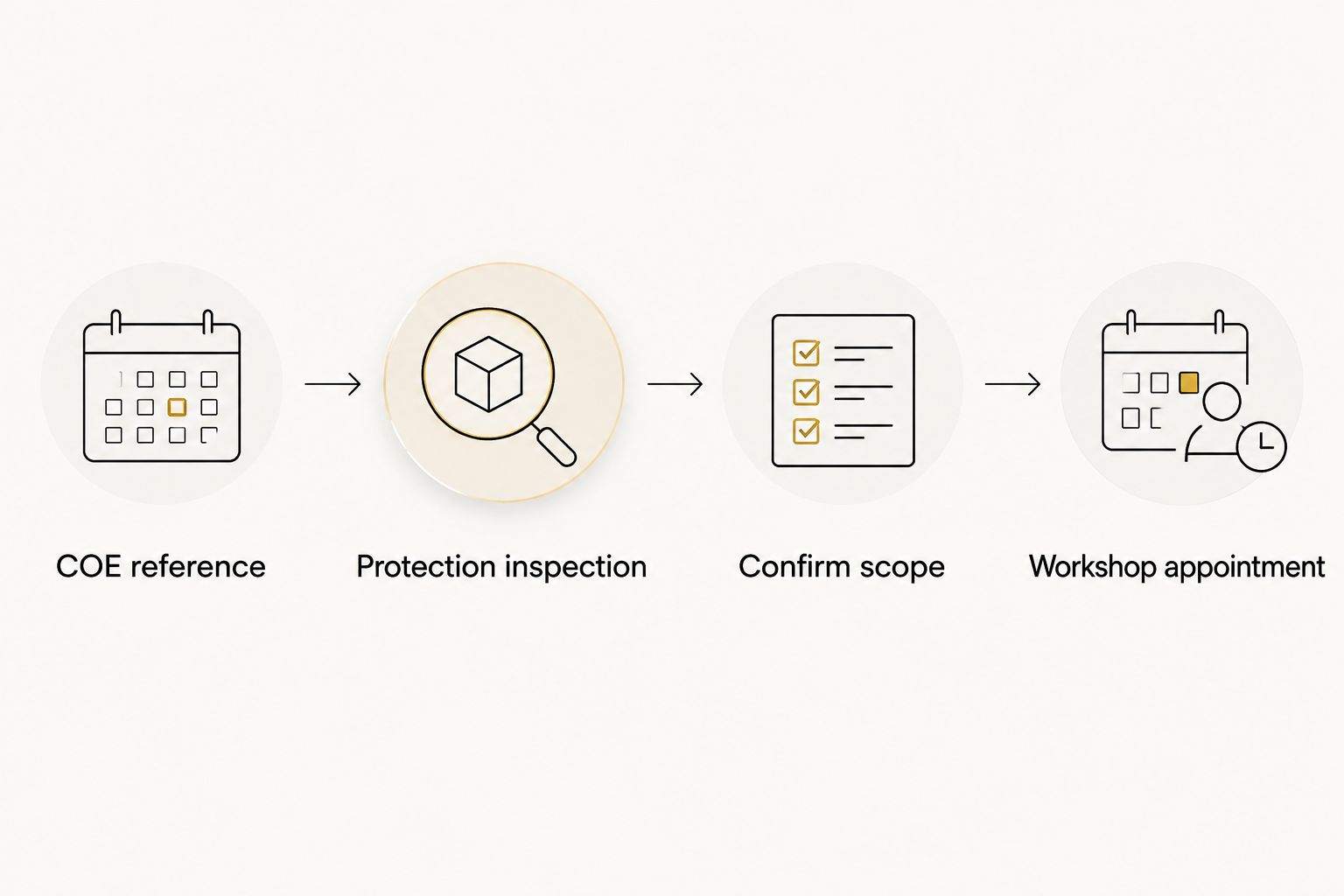
- Create an event titled “Paint protection inspection” 60 days before the reference date. Give it a practical time when you can review the car and contact an installer.
- In Add description, list the inspection questions: film lifting, visible damage, staining, previous panel repairs and the last documented coating service. Note which panels concern you.
- Create a second event titled “Confirm protection scope” 30 days before the reference date. Its description should ask you to review the inspection findings and decide whether to retain, maintain or replace the affected protection.
- For each event, select Add notification and choose a reminder offset that gives you time to act. Select Save after checking the date and time.
- If you agree a workshop appointment, create a third event using the workshop’s confirmed date. Add the agreed service scope and a 7-day notification if that gives you a useful preparation window.
Expected result: your calendar distinguishes an inspection prompt, a treatment decision and a confirmed appointment. Only the last represents agreed workshop time.
A 60-day planning window gives you room to ask questions; it does not guarantee a particular installation date. Adjust these suggested offsets to your ownership decision and the installer’s actual instructions.
Write “booking requested” rather than “confirmed” while you are waiting for the workshop’s reply. That small wording change prevents a reminder from being mistaken for an accepted appointment.
Your notification check
A saved event is not proof that your device will alert you. Test the delivery route before relying on a reminder scheduled months ahead.
- Create a temporary timed event 10 minutes ahead and give it a notification before its start.
- Check that the event belongs to the intended calendar and account. If you use the mobile app, confirm that the same calendar appears there.
- Allow calendar notifications in the relevant browser or device settings. Check whether a focus mode or notification restriction suppresses alerts.
- Wait for the test alert, then delete the temporary event. Reopen your real inspection event and verify its notification setting.
Expected result: a test notification reaches the device you intend to use. If it does not, fix delivery before relying on the COE-linked reminders.
For your 2026 setup, retain the written dates even after the test succeeds. A calendar reminder supports your planning; it does not replace checking official deadlines or confirming an appointment directly.
Update the workflow after COE renewal
Once renewal is completed, update the reference date from the official record. Do not calculate it from memory or assume that the workshop appointment establishes the new expiry date.
This workflow uses ordinary calendar events. Changing the reference event does not automatically shift the inspection and decision events. Review those linked dates yourself whenever the ownership plan or reference date changes.
- Open the reference event and update its date only after checking the renewed record. Add a short note describing what changed.
- Open each future inspection and decision event. Recalculate its date from the updated reference, or delete it if the original decision has already been completed.
- Leave completed workshop appointments on their actual dates. Their value is the service history, not their distance from the next COE milestone.
- Create future protection-maintenance events from the installer’s documented instructions. Keep these independent of the COE cycle.
The benefit of this simple approach is visibility: every event is easy to inspect and edit. Its limitation is manual date maintenance. Do not describe it as live synchronisation with vehicle records.
If you sell the car or decide not to retain it, remove future ownership-specific prompts. Keep any records you still need separately rather than leaving irrelevant reminders active.
Troubleshooting
The reminder appears, but nothing is booked
A Google Calendar event does not reserve workshop time. Contact the installer, agree the scope and date, then update the event to show confirmation. Keep the inspection reminder separate if the workshop first needs to assess the vehicle.
The COE date changed, but other events stayed put
Separate events do not inherit a changed date from your reference event. Open each future reminder and move it deliberately. Check the event descriptions too, because old dates written in the notes remain unchanged.
Notifications reach the wrong device or account
Check which account owns the event, whether that calendar is visible on your device and whether notifications are permitted. Repeat the temporary-event test after correcting the settings. Avoid creating duplicate reminders in several accounts as a workaround.
The film looks damaged before the scheduled inspection
Bring the assessment forward rather than waiting for the calendar date. Send clear photographs and identify the affected panel. Do not authorise polishing, film removal or a coating application solely because the existing event says “top-up”.
Maintenance does not match the COE timeline
Follow the installed product’s care instructions and the installer’s assessment. A COE milestone is an ownership checkpoint, not a film service-life specification. Keep product maintenance reminders on their own dates.
Customise your workflow
Use the calendar description to make the appointment useful, not merely visible. For a luxury or performance car, include the panels under review, any known repaint history and the exact protection recorded on the installation paperwork.
Before authorising work, ask EA Detailer to clarify the preparation required, the limits of the proposed treatment, any existing defects that remain, and the aftercare instructions. Request a written scope so your calendar reflects the service you actually agreed.
After collection, add the service date, treated panels and next instructed check to your records. Photograph the completed work for your own reference. Avoid turning an undocumented verbal suggestion into a permanent recurring treatment.
FAQ
How do I automate a COE renewal car paint protection schedule?
Create a verified COE reference event in Google Calendar, then add separate inspection and service-decision events with notifications. This automates reminders, not official renewal, diagnosis or workshop bookings.
Does PPF need a top-up when I renew my COE?
COE renewal does not establish that PPF needs treatment. PPF is a physical film; an installer should assess its condition before recommending maintenance, removal or replacement.
When should I arrange a paint protection inspection before COE renewal?
Use a planning window that leaves time for assessment and a service decision. This guide suggests an inspection 60 days before the verified reference date, but that is a planning choice rather than a maintenance requirement.
Will Google Calendar move my service reminders when the COE date changes?
Separate Google Calendar events do not automatically move when you edit the reference event. Update each future reminder and check any dates written in its description.
Can I use the same schedule for ceramic coating and XPEL PPF?
You can use the same calendar structure, but the maintenance instructions must remain product-specific. Record whether the appointment concerns ceramic coating, XPEL PPF or another documented protection system.
What should I send EA Detailer before a protection assessment?
Provide the installed product name if documented, installation history, affected panels and clear photographs of your concerns. Ask what further information is needed before agreeing the appointment scope.
Does a calendar reminder confirm my detailing appointment?
A calendar reminder does not confirm a workshop appointment. Treat the booking as confirmed only after the workshop agrees the date and service scope.
One last thing
Keep the reminder specific but the treatment undecided until inspection. “Inspect lifting film on the bonnet” is a better instruction than “renew all PPF”: it records the problem without pre-authorising the solution.
When reviewing your 2026 schedule, check the event title first. If it describes a treatment nobody has assessed, rewrite it as a decision or inspection task.
Related guides
- Automatic reminders for ceramic coating maintenance washes
- Document your ceramic coating history on your SGCarMart listing
- Paint protection film for track-day drivers

Leave a Reply